An AEM server holds both content and binary data. For better deployment isolation, performance and scalability, binary data such as media files can be configured to be stored separately from the content nodes.
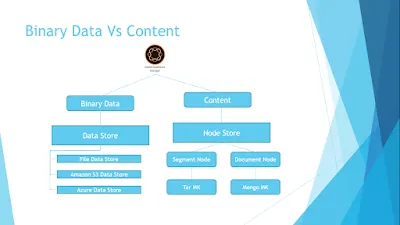
Binary data generally lives in a data store and content nodes in a node store. Both are configured through their persistent identifiers (PIDs) in the OSGi configuration.
When working with a large number of binaries, Adobe recommends an external data store rather than the default node store, for better performance. The external data store can be a File Data Store, an Amazon S3 Data Store or an Azure Data Store, all of which work well for binaries such as media files.
There are two kinds of node store: the segment node store, the basis of TarMK, and the document node store, the basis of MongoMK in AEM 6.x.
Configuration PIDs
| Storage | PID configuration file |
|---|---|
| Document node store | org.apache.jackrabbit.oak.plugins.document.DocumentNodeStoreService.config |
| Segment node store | org.apache.jackrabbit.oak.segment.SegmentNodeStoreService.config |
| File data store | org.apache.jackrabbit.oak.plugins.blob.datastore.FileDataStore.config |
| Amazon S3 data store | org.apache.jackrabbit.oak.plugins.blob.datastore.S3DataStore.config |
| Azure data store | org.apache.jackrabbit.oak.plugins.blob.datastore.AzureDataStore.config |
Summary
Choosing the recommended configuration for your requirements gives a high-performing AEM instance. The concepts are the same for all AEM 6.x versions, apart from a few minor configuration changes.
Related: AEM 6.5 new features in Assets.