What Is the AEM Pattern Detector? Its Role in Upgrading to AEM 6.4
On this page
The Pattern Detector helps assess the complexity of an AEM upgrade.
How it works
Before an upgrade, the Pattern Detector scans the existing code base for anything that would break. It then produces a list of action items for the issues it finds, with a detailed explanation of each violation and guidance on fixing it.
Why it helps
AEM 6.4 reserves some paths and Granite code for internal AEM use. The Pattern Detector checks for anything at those paths that the upgrade would overwrite, and for any API use that is not compatible with 6.4. Running it is a mandatory step when upgrading to AEM 6.4.
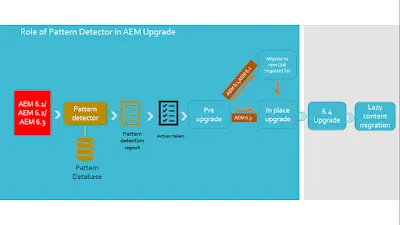
Installing and configuring it
The Pattern Detector is available for AEM 6.1, 6.2 and 6.3 and is downloaded with an Adobe ID. It is installed through the AEM Package Manager. Adobe's AEM 6.4 documentation on the Pattern Detector has the full installation and configuration steps.
Reading the report
In the web console, open Status > Pattern Detector. Reports are available as plain text or JSON.
Some of the report codes
OCU | Deprecated usages |
ECU | Suspicious overlays, overrides and references |
LOCP | Packages that overwrite /libs |
NBCC | Non-backward-compatible changes |
CAV | Advises reducing overlaid content in general, for security reasons |
Where to run it
Run the Pattern Detector on a stage environment rather than production, to avoid slowing production down.
Moving from another CMS rather than an older AEM? See steps to migrate a third-party CMS website to AEM.
More in Operations, SEO and upgrades
- Robots.txt File in AEM Websites
How to serve a robots.txt from an AEM website: store it in the DAM, map it to /robots.txt with the Sling resource resolver, and allow it through the dispatcher.
- Hide the /content Root Path in AEM Publish and Website URLs
How to remove /content/sitename from public AEM URLs: Sling resource resolver mappings on publish, then mod_rewrite rules and DispatcherUseProcessedURL on the dispatcher.
- Steps to Migrate a Third-Party CMS Website to AEM
The steps of a CMS-to-AEM migration project: analysis, content and asset strategy, design, content migration (manual, automated, hybrid), testing and estimation.
- Generate a Report of Users' Last Login in AEM
How to report every user's last login in AEM 6.5: record it with an AuthenticationInfoPostProcessor service, then query it with an ACS AEM Commons report.
- ACS AEM Commons Page Compare Utility in AEM 6.4
What ACS AEM Commons adds to AEM, how to install it, and how to use its Page Compare tool to compare the content and structure of two pages.