AEM keeps gaining ground thanks to its enterprise content management capabilities, and many projects involve moving a site from another CMS to AEM — Drupal to AEM, Salesforce to AEM and so on.
Here is the common process, step by step, for migrating any third-party CMS website to AEM.
The major steps of a migration project
- Analyze the current system and the integrations involved
- Define the content strategy
- Define the asset strategy
- Design the new system, including integrations
- Migrate the content to the new system
- Test the new system
Background
Before migrating a site, understand how the current CMS works, then map its elements to the related elements in AEM.
For example, a WordPress site stores its content in one place and its images, videos and PDFs in another repository. Understanding the layers of both systems plays a big role in a successful migration.
Setting up the environment
For a smooth migration you need an AEM development environment ready to receive data from the current system quickly. A minimal setup is one author instance, two to four publish instances and a dispatcher.
Content migration strategy
- Content evaluation
- Cleanup — sanitize the content
- Content mapping — organize the content hierarchy
- Design — based on the analysis of the existing system, design a solution with a proper digital asset structure, metadata, tagging, client libraries, and target AEM templates and components
- Content migration — there are three ways:
- manual migration, when the old system's content is unstructured
- automated migration, when the old system's content is structured
- hybrid migration, when it has both
- Content verification
Asset strategy
Assets play an important role in any CMS. Plan for:
- asset migration and categorization
- extracting metadata from the old system and applying it in AEM
Getting into action
Create the templates and components according to the design. Once they are ready, identify the tools and methods for exporting data from the current system into AEM. In almost every scenario, AEM migrations end up hybrid.
Using a REST API for migration
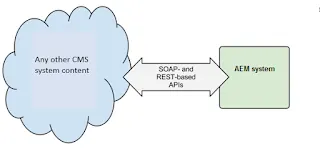
Some CMSs expose their content through a REST API. AEM can call it and import the data directly. For this, the migration scripts need to:
- map the current system's templates to AEM templates
- map the current system's components to AEM components
Once the content and assets are migrated, start manual testing by creating new pages according to the design.
How to estimate an AEM migration project
- List the templates
- Estimate the templates
- List the components
- Estimate the components
- Analyze the current CMS content (XML/JSON data)
- Estimate the scripts for each component (XML/JSON data to AEM component)
- Estimate asset migration and categorization (extracting and applying metadata for digital assets in AEM)
- Estimate the analytics work
- Estimate the integrations (login, authorization, search)
- Estimate workflow creation
Before migrating from an older AEM version rather than another CMS, run the Pattern Detector.