AEM Content Fragments can be read through JSON URLs, which is a handy way to check the data while authoring.
Enable the JSON output
Open /system/console/configMgr, find AEM Content Service Feature Flag and select the Enable AEM Content Services check box.
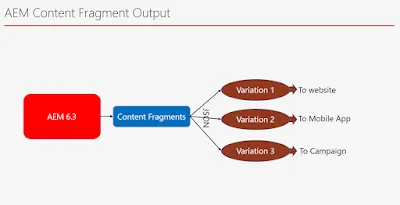
Read a fragment as JSON
Say we have created a Content Fragment called this-is-my-frag. The complete content is available through the infinity JSON:
http://localhost:4502/content/dam/this-is-my-frag.infinity.jsonFor the Content Services (CaaS) output, use:
http://localhost:4502/content/dam/this-is-my-frag/_jcr_content.caas.json{
"_children": [{
"name": "jcr:content",
"title": "This is my frag",
"path": "/content/dam/this-is-my-frag/jcr:content",
"type": "dam:AssetContent",
"href": "http://localhost:4502/content/dam/this-is-my-frag/_jcr_content.caas.json"
}]
}Loading the child from that _jcr_content.caas.json gives:
{
    "title": "This is my frag",
    "dam:assetState": "processed",
    "description": "Hello there",
    "contentFragment": true,
    "lastFragmentSave": "Wed Jun 21 2017 15:29:39 GMT+0530",
    "dam:relativePath": "this-is-my-frag",
    "_children": [{
        "name": "renditions",
        "path": "/content/dam/this-is-my-frag/jcr:content/renditions",
        "type": "nt:folder",
        "href": "http://localhost:4502/content/dam/this-is-my-frag/_jcr_content/renditions.caas.json"
    }, {
        "name": "related",
        "path": "/content/dam/this-is-my-frag/jcr:content/related",
        "type": "nt:unstructured",
        "href": "http://localhost:4502/content/dam/this-is-my-frag/_jcr_content/related.caas.json"
    }, {
        "name": "associated",
        "path": "/content/dam/this-is-my-frag/jcr:content/associated",
        "type": "sling/collection",
        "href": "http://localhost:4502/content/dam/this-is-my-frag/_jcr_content/associated.caas.json"
    }, {
        "name": "metadata",
        "path": "/content/dam/this-is-my-frag/jcr:content/metadata",
        "type": "nt:unstructured",
        "href": "http://localhost:4502/content/dam/this-is-my-frag/_jcr_content/metadata.caas.json"
    }, {
        "name": "model",
        "title": "Simple Fragment",
        "path": "/content/dam/this-is-my-frag/jcr:content/model",
        "type": "nt:unstructured",
        "href": "http://localhost:4502/content/dam/this-is-my-frag/_jcr_content/model.caas.json"
    }]
}
From here you can walk the children and read the renditions, related, associated, metadata and model nodes. For example, the model returns:
{
    "title": "Simple Fragment",
    "version": 2,
    "description": "A simple fragment, containing one single element and no predefined variations",
    "precreateElements": true,
    "_children": [{
        "name": "elements",
        "path": "/content/dam/this-is-my-frag/jcr:content/model/elements",
        "type": "nt:unstructured",
        "href": "http://localhost:4502/content/dam/this-is-my-frag/_jcr_content/model/elements.caas.json"
    }, {
        "name": "variations",
        "path": "/content/dam/this-is-my-frag/jcr:content/model/variations",
        "type": "nt:unstructured",
        "href": "http://localhost:4502/content/dam/this-is-my-frag/_jcr_content/model/variations.caas.json"
    }]
}
and its variations link loads:
{
    "_children": [{
        "name": "variation2",
        "title": "variation2",
        "path": "/content/dam/this-is-my-frag/jcr:content/model/variations/variation2",
        "type": "nt:unstructured",
        "href": "http://localhost:4502/content/dam/this-is-my-frag/_jcr_content/model/variations/variation2.caas.json"
    }]
}
This is how you iterate through a Content Fragment's JSON.

From AEM 6.4, the JSON exporter and the Content Fragment core component give a simpler .model.json output — see AEM 6.4 Content Fragment output as JSON. For how fragments compare with Experience Fragments, see Experience Fragments vs Content Fragments.